

One pass, clear groups
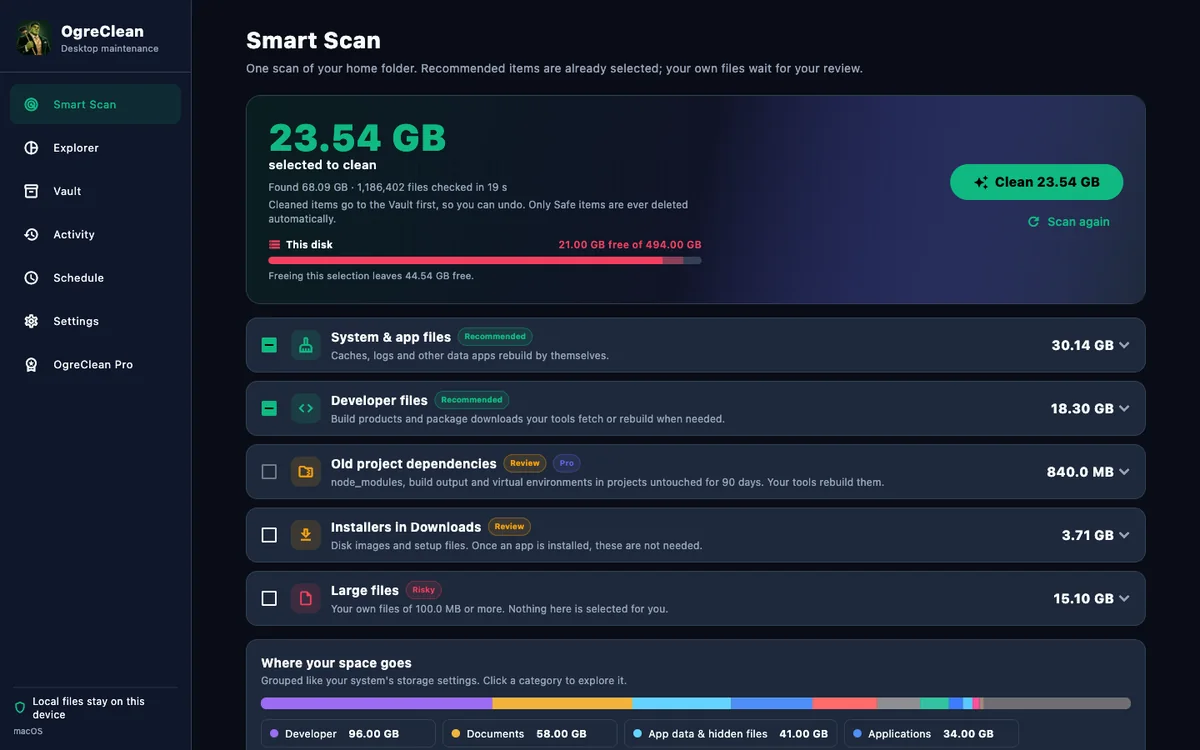
System and app files, developer files, installers in Downloads, large files and old project dependencies are listed in separate groups.
Desktop storage cleanup
OgreClean scans your home folder in one pass, groups what is using space, and labels every item Safe, Review or Risky. Cleaned items wait in a recoverable Vault, so a cleanup can be undone.
Designed for macOS and Windows. Current features and purchase options are shown in the app and the store.
What it does
OgreClean reads file names, sizes and dates, never file contents. Results are grouped so you can decide what to do with each kind of item.
System and app files, developer files, installers in Downloads, large files and old project dependencies are listed in separate groups.
Every item is Safe, Review or Risky with a one-line reason. Only Safe items, which apps rebuild by themselves, are preselected. Your own files are never selected for you.
Cleaned items go to the Ogre Vault first. Undo restores the whole cleanup. Items in the Review and Risky groups are never deleted automatically.
See space by the categories of your system’s storage settings, or open any folder you choose and drill down into the largest items.
In your control
Folders macOS protects, such as Mail, Messages and the Trash, are included only if you turn on Full Disk Access. The app explains the setting and never requires it.
USB drives, network shares and connected devices appear as scan locations but are scanned only when you add them.
Sizes are the space actually used on disk. Online-only cloud placeholders are never listed or opened, and a scan does not cross into another volume.
Your files stay close
OgreClean has no account, analytics or tracking. File names, sizes and scan results are processed on your computer. Store purchases are handled by the Mac App Store or Microsoft Store.
The details, all in one place
Everything specific to OgreClean lives here. Company-wide publisher details are on the Impressum.
Smart Scan, review labels, the Vault, drives and restore controls.
Open SupportFolder access, scan results, the Vault and purchases.
Open PrivacyFile access, local processing and store purchases.
Open TermsApple’s Standard Licensed Application End User License Agreement. Microsoft Store customers follow the terms shown by Microsoft Store.
Open LegalPublisher identity and contact details, kept in one place for every Ogre Labs app.
OpenStill need a hand?
Say which app you use, your device and operating-system version, and what you were trying to do. Please leave out passwords, payment details, health records, client information and private files.
A cleanup frees space only when items are actually deleted or moved off the volume. The amount you recover depends on your system and what you choose to clean.